A private document exchange, not a shared drive
MyLynk gives your firm a controlled space to send and receive sensitive documents with clients — without routing them through a generic file-sharing tool your clients half-trust and you can't fully control.
How it works
Your client gets a link, not a login
A client enters their email on your firm's own upload page and gets a single-use, time-limited link back — no account, no password to remember.
Documents move in both directions
Clients upload what you've asked for. You send back what's finished. Each side sees exactly what's been sent and what's outstanding.
Ask for specific documents by name
Create a named request — "2024 W-2" — and your client sees it as a simple checklist item the moment they log in.
Signatures happen without leaving the portal
Review, sign, and return a document right there — no separate e-signature subscription, no extra login required.
Every document proves itself
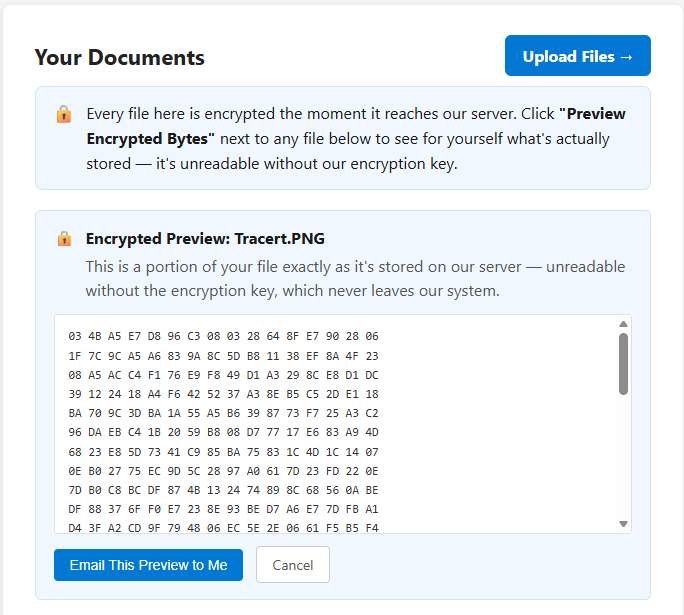
Click "Preview Encrypted Bytes" on any file and see exactly what's stored: unreadable, scrambled data — not a plain document you're asked to trust is encrypted. Review it on the page, or have a copy emailed to you.
Features
Secure, no-login client access
Clients reach their documents through a single-use magic link tied to their email — nothing to remember, nothing for a lost password to compromise.
Two-way document exchange
Not just an upload box. Send completed work back to clients the same way they sent documents to you, with the same encryption and audit trail on both sides.
Named document requests
Ask for something specific, by name, and track it to completion — clients see a checklist, not a guessing game.
E-signature, built in
Typed or drawn signatures, a full consent and audit trail, and optional ID verification for documents that need it.
A reusable document library
Publish a document once and let any client find, fill in, and sign it themselves. Published documents aren't subject to the automatic retention clock that applies to client uploads.
You decide who sees what
Staff access can be scoped by client or by file group, so a team member only sees the work they're actually assigned to.
Client-controlled retention
Clients choose how long their own uploaded documents stay on file, with an automatic reminder before anything expires. Their documents, their timeline.
Your brand, not ours
Your own upload domain, your own brand color, and — if you want — your own outgoing mail server.
Mandatory two-factor authentication
Every role — administrators, staff, and clients downloading sensitive documents — is protected. Not optional, not an add-on.
See the proof yourself
Every real competitor in this category encrypts your files at rest. That's not a differentiator — it's the baseline. What's different about MyLynk is that you don't have to take our word for it.
Click "Preview Encrypted Bytes" on any document, and see the raw, scrambled ciphertext exactly as it sits on our server. Email yourself a copy for your own records. It's the difference between a vendor telling you your data is safe, and showing you.
Built for firms like yours
Large platforms make large targets. The past several years have made that painfully clear — massive breaches at household-name companies, millions of records exposed at once, because a single point of failure held everyone's data.
MyLynk is deliberately small. There's no sprawling attack surface, no distant support queue, and no incentive to cut corners at scale. When something needs attention, you're talking to the person who actually built the system — not a ticket number.